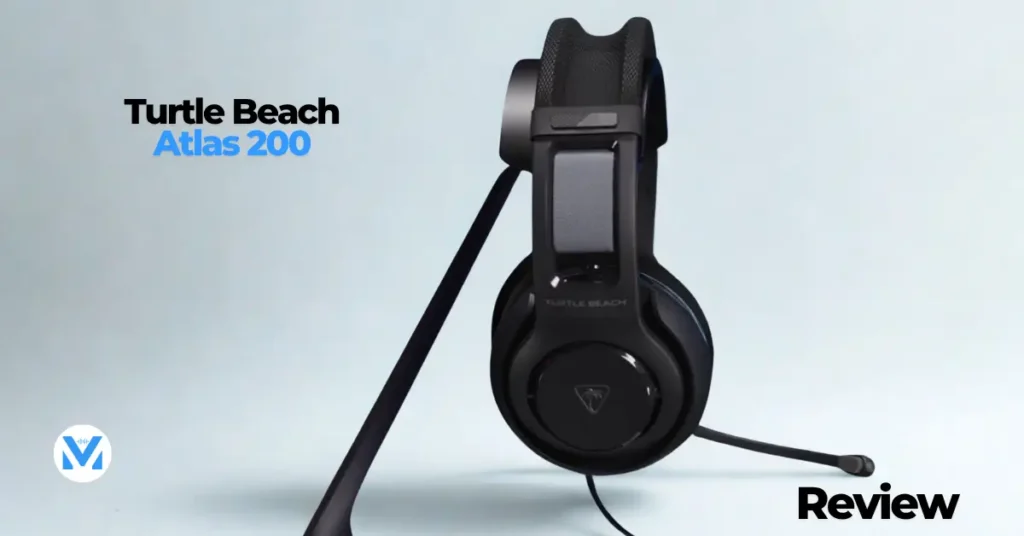
The budget gaming headset market is fiercely competitive, and standing out in it requires more than just an attractive price tag. The Turtle Beach Atlas 200 makes a compelling case for itself with a combination of thoughtful design, solid audio performance, and smart feature choices that punch well above what its price point might suggest.
Starting at $59.99 for the multiplatform version and going up to $69.99 for the PC-focused variant — which includes a USB DAC dongle — the Atlas 200 represents one of the more interesting options currently available in this competitive segment. This review covers the full picture: from build quality and comfort to sound performance and software, comparing it along the way to some notable competitors including the SteelSeries Nova 1 and the HyperX Cloud X.
Pricing, and Configuration Options
Before diving into the headset itself, it’s worth understanding the different versions available, because the Turtle Beach Atlas 200 comes in a few configurations that cater to different platforms and budgets. The most affordable option is the multiplatform version at $59.99, which is available in black and features a standard gray headband. This version works across PC, PlayStation, Xbox, and mobile devices via its 3.5mm analog connection.
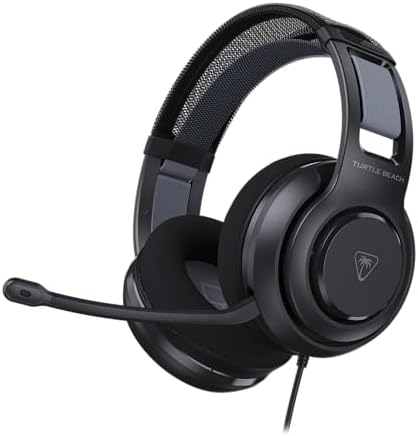
The PlayStation-specific version is available in both black and white, though both carry PlayStation branding on the headband — something to keep in mind if you’d prefer a cleaner aesthetic. Like the multiplatform model, it uses a 3.5mm analog connection, so it is technically compatible with other devices despite its branding.
Versions
The version under review here is the PC variant, priced at $69.99 and available in black only. The defining difference from the other versions is the inclusion of a USB-A to 3.5mm TRRS DAC dongle — a compact digital-to-analog converter that connects the headset to a PC via USB rather than plugging directly into the motherboard’s 3.5mm port. That ten-dollar premium buys you a meaningful upgrade in audio quality and software functionality on PC, though it does come with one notable caveat for PlayStation users, which will be explained shortly.
The PC DAC Dongle
For PC gamers, the DAC dongle included with the $69.99 version is genuinely worth the extra ten dollars. Onboard audio built into most motherboards is rarely impressive — it shares electrical pathways with numerous other components, which often causes interference and introduces noise into the audio signal. The output quality can also vary considerably between boards. A dedicated DAC bypasses all of that by handling the digital-to-analog conversion in a separate, purpose-built piece of hardware, which typically results in a cleaner, quieter, and more detailed sound.
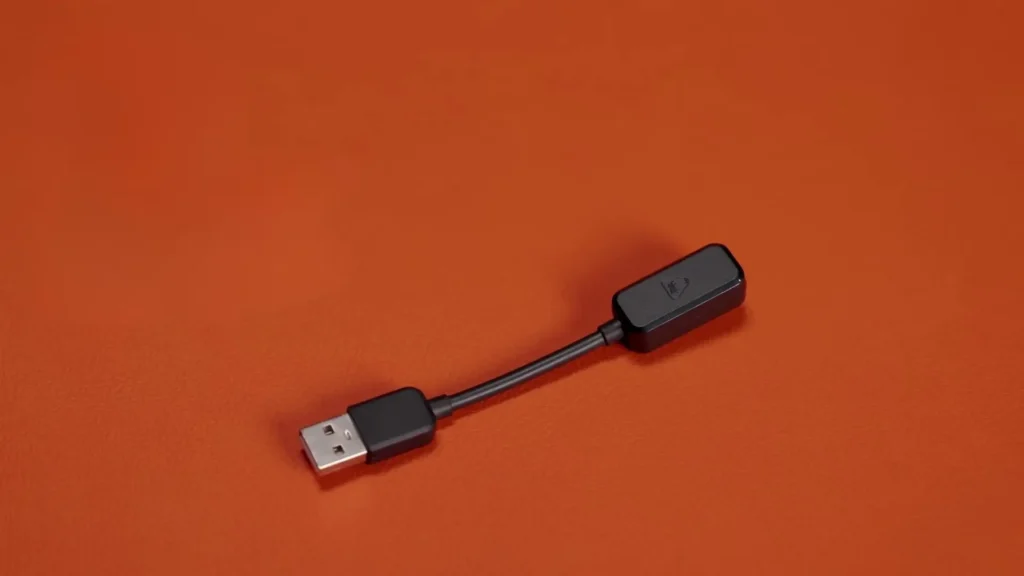
For PlayStation users, however, the recommendation changes. Although the idea of using a dedicated DAC with a PS5 sounds appealing, the dongle actually delivers less volume output than plugging the headset directly into the DualSense controller’s 3.5mm port. If you’re accustomed to higher listening volumes, you may find the dongle version disappointingly quiet on PlayStation.
Additionally, the EQ settings configured through the Swarm 2 software are saved to the app and the Windows environment — they do not carry over to the dongle itself. That means there’s no sonic advantage to using the dongle on PlayStation; both the analog and dongle versions sound identical on that platform. The advice is straightforward: PlayStation users should save the ten dollars and go with the analog version.
Build Quality
The Turtle Beach Atlas 200 is a closed-back headset, meaning the ear cups are completely sealed. This distinguishes it from the higher-end Turtle Beach Atlas Air, which uses an open-back design. Closed-back headsets tend to have stronger bass response and better passive isolation, but they trade some of the natural soundstage width that open-back designs offer. The Turtle Beach Atlas 200 leans into this with a sound profile that reflects the closed-back character, which will be discussed in more detail in the audio section.
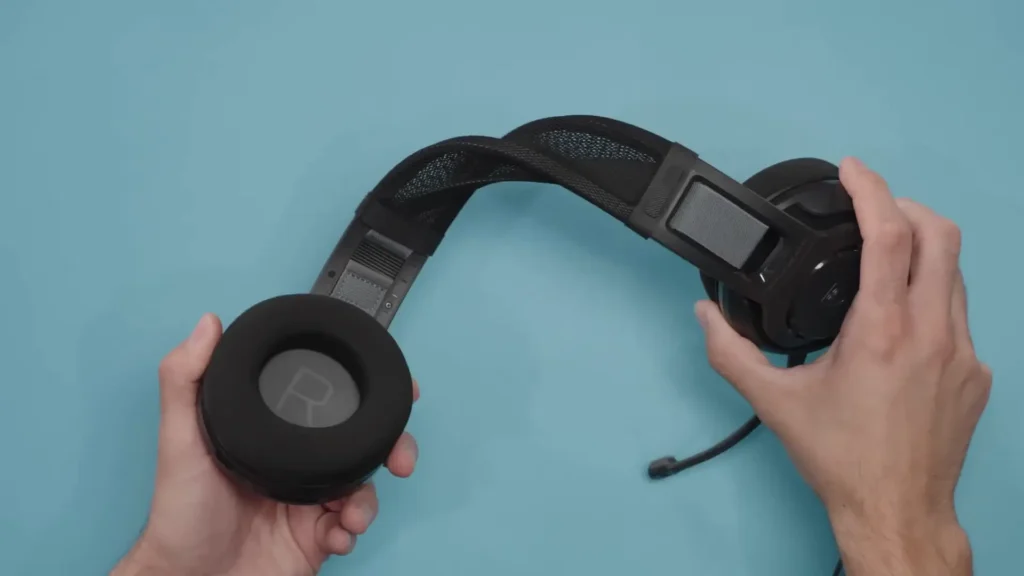
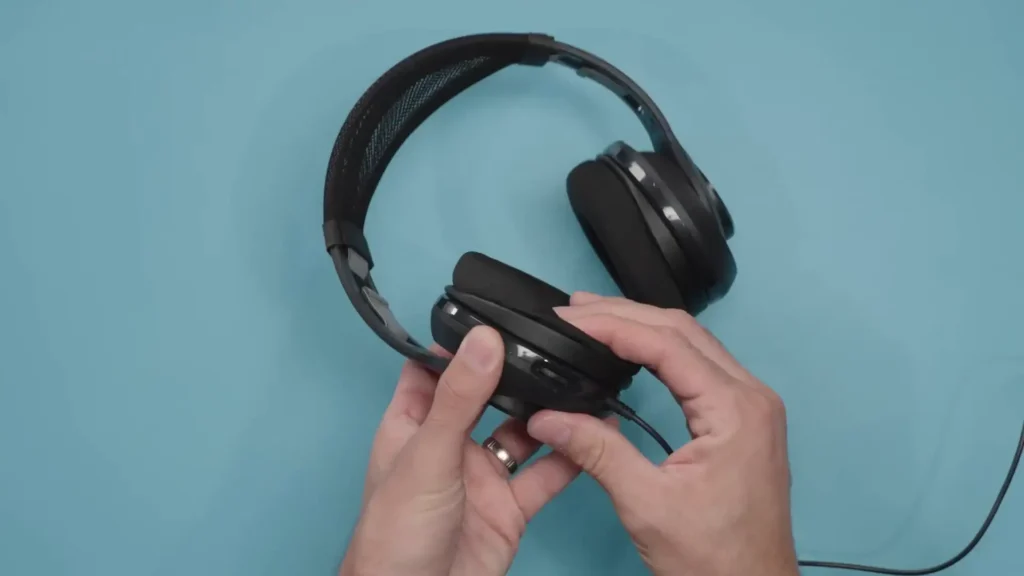
The ear cups themselves use a mounting mechanism that allows them to pivot or tilt inward and outward, though they cannot rotate on a traditional swivel axis. This is partially compensated by the ear pad itself, which has a subtle three-dimensional shape and a slight angle cut into it to help direct the cups toward the ears more naturally. The pads are thicker toward the bottom, which aids in achieving a proper acoustic seal — an important factor for bass performance and overall sound quality. It’s a small but thoughtful touch that shows genuine attention to ergonomics.
The headband employs a suspension strap system with Velcro adjustability, which keeps the overall weight feeling minimal on the head. The clamp force is quite light, resulting in a very comfortable long-session wear experience. The chassis shares a lot of the design DNA that made the Atlas Air appealing, though with slightly reduced articulation due to the fixed headband.
Design
One design limitation worth flagging is that the headset does not fold flat or collapse for compact storage. Because of its rigid structure, it will always occupy its full footprint in a bag or on a desk. This makes it less than ideal for travel or for anyone with limited storage space.
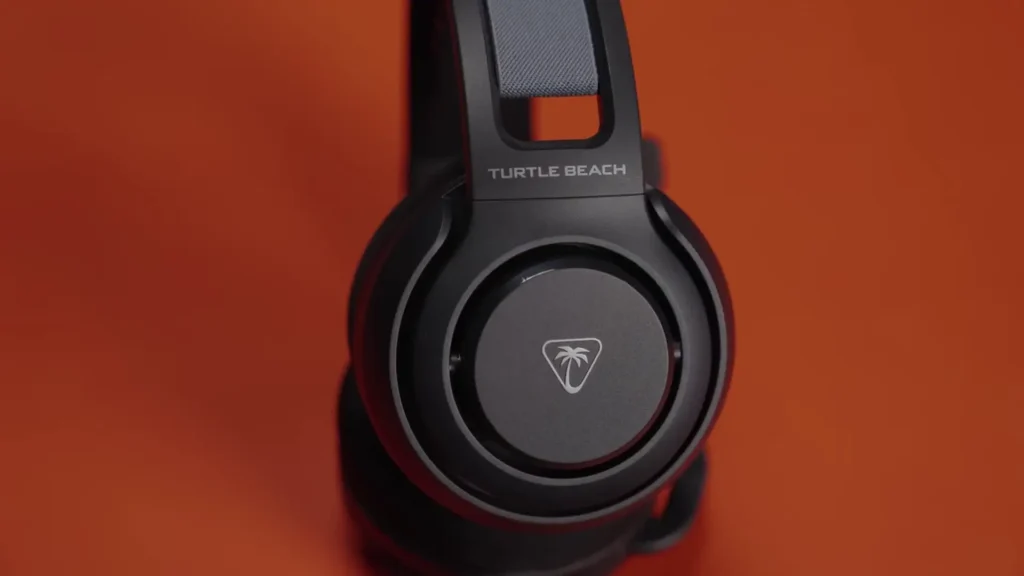
The microphone is not detachable, which is a common cost-saving choice in this price range. It flips up to mute — rotating it upward disengages the mic — and it can be folded almost completely out of the way when not in use. The boom arm itself is long enough and flexible enough to position correctly, though out of the box it tends to sit slightly higher than ideal, requiring a small adjustment to get it below face level. It’s a minor inconvenience that you’ll likely correct once and then forget about.
One area where cost-cutting is more noticeable is the fixed cable. A removable cable would have been a welcome addition, both for durability — cables do fail over time — and for flexibility in swapping configurations. A detachable cable is a feature that would have elevated the Atlas 200 further. That said, the cable itself is serviceable, and the absence of a removable option is fairly common at this price tier.
Comfort
Comfort is genuinely one of the Turtle Beach Atlas 200’s strongest suits. The combination of a light clamp force, the suspension headband system, and the shaped ear pads makes it one of the more comfortable headsets in its class for extended gaming sessions. The ear cup opening measures approximately 53mm across and 24mm of depth at the front, increasing to 30mm at the rear — dimensions that provide adequate clearance for most ear sizes, though those with larger ears may notice the cups feeling somewhat close.
Glasses Compatibility
For glasses wearers, the picture is more nuanced. Using several pairs of Gunnar gaming glasses with different temple thicknesses as a reference point, the Turtle Beach Atlas 200 performs well with thinner frames. The soft, breathable pads are compliant enough that thinner temples can be accommodated without significant pressure or discomfort. However, with thicker temple frames, the situation changes. Because the ear cup opening isn’t particularly tall, the glasses frame tends to press against the upper area of the ear more noticeably.
Interestingly, the SteelSeries Nova 1 — which has slightly more clamp force overall — actually performs better for glasses wearers with thick frames because of its taller ear cup design. The additional height provides more clearance above the ear, reducing pressure on the temple arms. The HyperX Cloud X, meanwhile, has better ear clearance but uses a shallower leatherette pad that puts more direct pressure on the glasses frame. Each headset has its trade-offs for glasses users, and the best choice will depend on your specific frame shape and thickness.
One other consideration for glasses wearers is how the seal is affected. Of the three headsets compared here, the Atlas 200 and the Nova 1 both maintain their sound signatures fairly consistently when glasses are in use. The HyperX, however, is more sensitive to seal disruption — which can translate to a noticeable reduction in bass when glasses break the acoustic seal.
Controls
The controls on the Turtle Beach Atlas 200 are refreshingly simple. An analog volume wheel on the ear cup provides a satisfying range from minimum to maximum volume, with a clear stopping point at each end. It’s positioned intuitively and easy to locate without looking, which is exactly what you want from inline controls. The flip-to-mute mechanism for the microphone is equally intuitive — flipping the boom up activates the mute, and rotating it all the way in tucks it neatly away.
Microphone Design
The microphone capsule design includes a small piece of integrated foam inside the capsule housing, which serves as a built-in windscreen. This helps reduce plosive sounds — the popping artifacts that often occur with ‘p’ and ‘b’ sounds — without requiring an external pop filter or foam sock. It’s a small detail, but it reflects genuine thought put into the microphone’s practical usability, especially at a price point where such niceties are not always guaranteed.
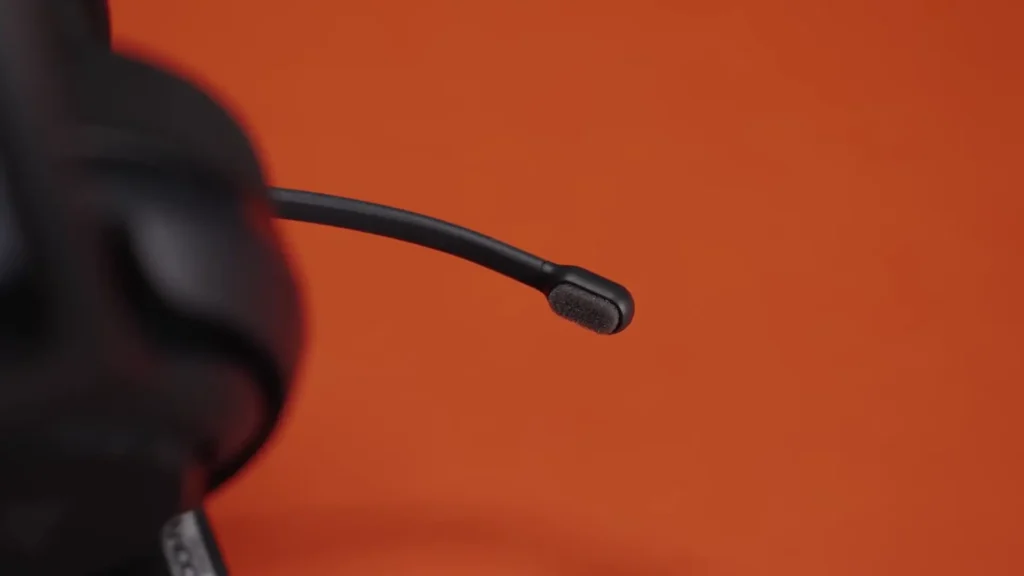
Because the microphone connects via a wired analog signal through the DAC rather than a wireless transmission, it benefits from the full bandwidth of a wired connection. There is no wireless compression, no latency jitter, and no range-related drop-offs. The result is that the microphone can perform to the full extent of its capsule quality — and that capsule quality turns out to be quite good for this price range. Voice capture is clear, natural, and sits toward the upper end of what budget gaming headsets typically offer.
Swarm 2 Software
The Swarm 2 companion software is available to PC version owners who are using the DAC dongle, and it has matured considerably. The software provides a range of customization options that meaningfully extend what the headset can do, particularly in the areas of EQ adjustment and audio routing.
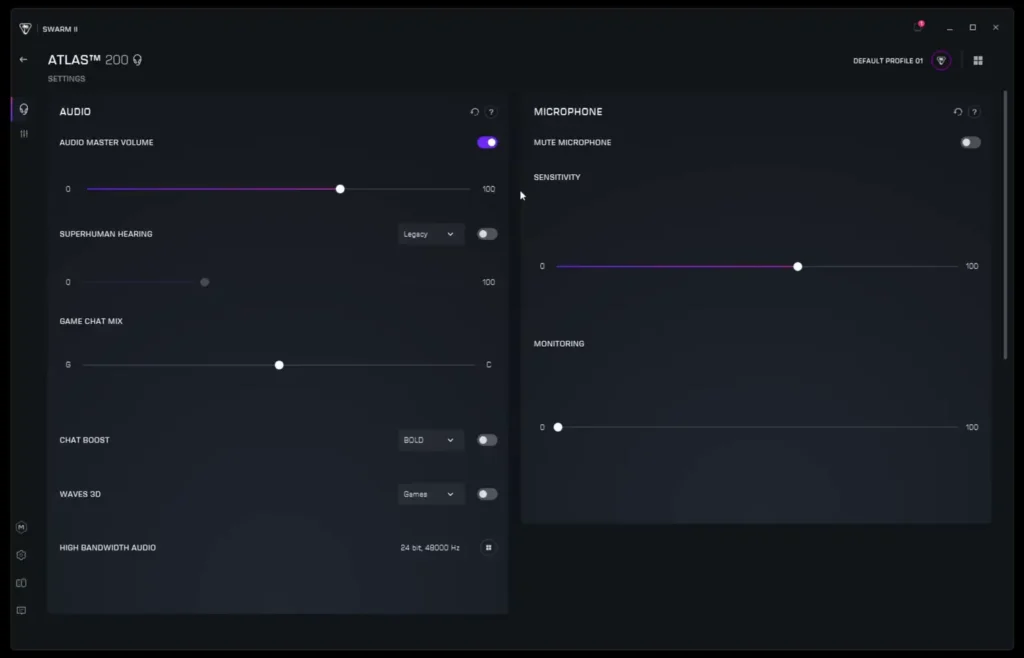
Volume control within Swarm 2 links to Windows digital volume, so adjustments made here are reflected system-wide and can also be made using keyboard media controls. The Superhuman Hearing feature — a long-standing Turtle Beach trademark — offers three modes that alter the headset’s frequency response and apply compression to enhance subtle in-game sounds such as footsteps and distant audio cues. This feature is particularly popular with competitive first-person shooter players. That said, enabling it does compress the audio’s dynamic range and can strip away some of the naturalness from the sound. Using it at a low setting, around 30%, offers a reasonable balance if you want some of the benefit without fully sacrificing audio fidelity.
Functionality
Swarm 2 installs a virtual audio driver that enables game-to-chat mix functionality, allowing you to independently control the volume balance between game audio and chat audio through the software interface. A Chat Boost option is also available, which applies EQ enhancements to teammates’ voices and can raise their volume level — useful when dealing with quiet speakers.
The software also supports Waves 3D audio processing, which offers three different spatial modes for a more immersive listening experience. While it can sound engaging for certain content, it does not work equally well across all games or media. Dolby Atmos tends to be a more consistent and versatile option for spatial audio, so Waves 3D is best treated as something to experiment with rather than rely on.
On the audio output side, Swarm 2 defaults to 24-bit at 48kHz, which is the recommended setting. There is an option to increase to 96kHz, but the practical benefit is negligible — virtually all game engines operate at 48kHz or below, so the extra bandwidth does nothing meaningful in gaming contexts. The microphone is capped at 48kHz, which is appropriate and more than sufficient.
Features
One of the standout features in Swarm 2 is the microphone monitoring implementation. Sidetone — hearing your own voice through the headset while speaking — is handled here significantly better than Windows’ native sidetone feature. It operates in real time with minimal latency and scales intelligently with the headset’s volume setting. For anyone who prioritizes quality microphone monitoring, this alone makes a strong case for choosing the dongle version on PC.
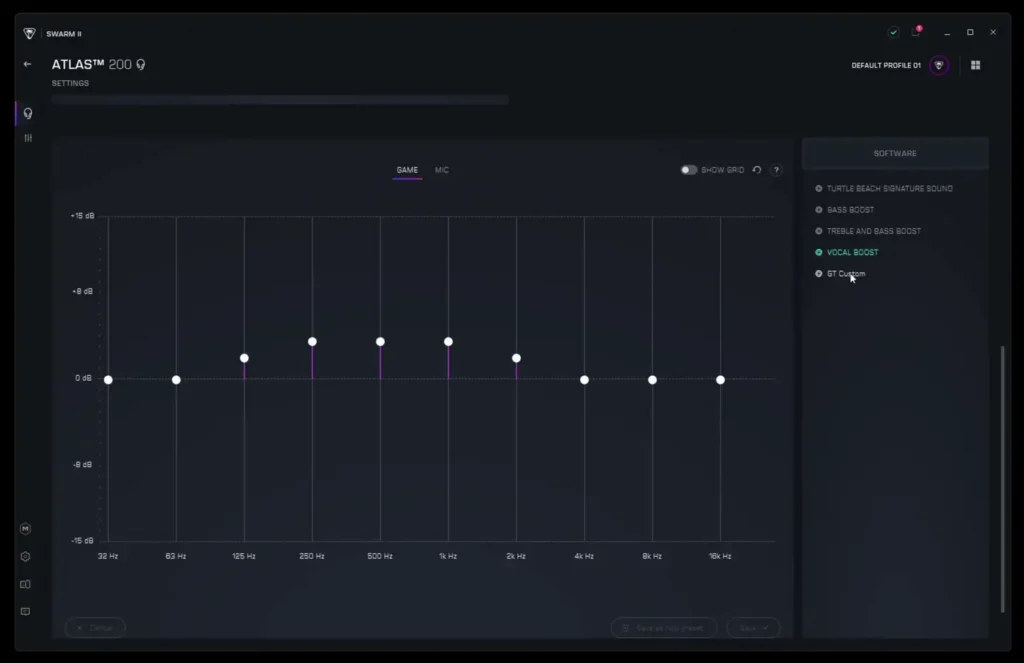
EQ customization in Swarm 2 includes four preset options — Signature Sound, Objective Audio (effectively flat), Bass Boost, Bass and Treble Boost, and Vocal Boost — as well as a fully customizable EQ. The Signature Sound preset matches the analog output of the headset almost exactly, which is a mark of how well-calibrated the software is. The Objective Audio preset essentially eliminates any coloring, providing a reference-flat response. Measurements confirm that the dongle in Signature Sound mode is virtually identical to the analog connection — the frequency response difference falls within the margin of error that results from minor repositioning of the headset on the measurement rig.
Sound Quality
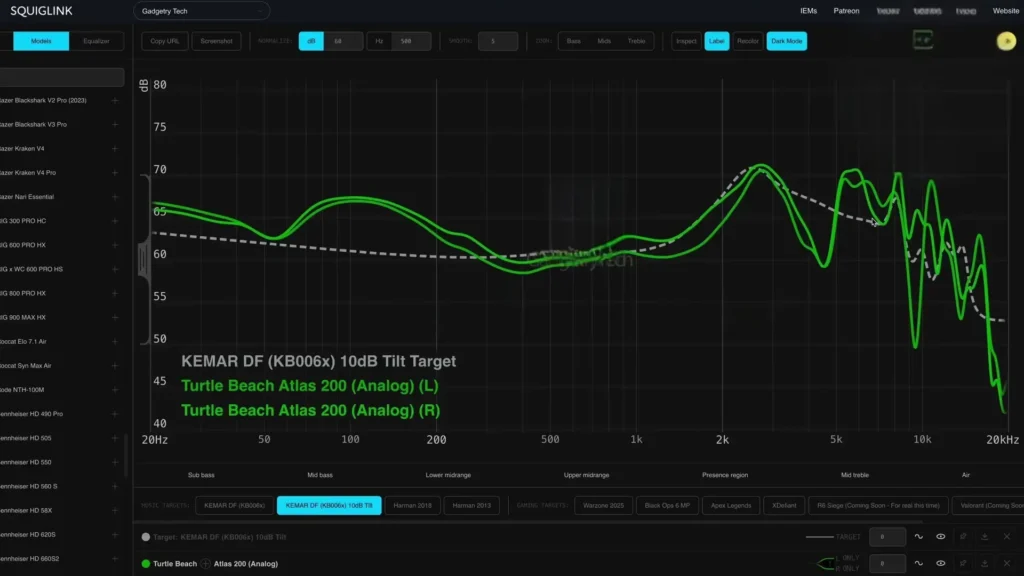
Measurements were taken using a Gras KB0065 pinnacle ear simulator across more than 100 measurement positions and configurations, covering different EQ profiles, analog versus dongle, and various placement variations. The Turtle Beach Atlas 200 follows Turtle Beach’s signature sound tuning, which is characterized by a mid-bass emphasis that adds warmth and punch without crossing into the bloated, muddy territory that can afflict some competitors. This distinction is important — some headsets in this price range, particularly from SteelSeries and Razer, can sound thick and clouded in the upper-bass and low-midrange region. The Atlas 200 keeps the mid-bass lift controlled enough that it doesn’t spill over into the critical vocal and instrument frequencies.
Mid-range tuning is one of Turtle Beach’s traditional strengths, and the Atlas 200 upholds that reputation. The 1kHz to 3kHz region — where voices, lead instruments, and much of the perceptual detail in game audio lives — is handled well. There is a slight channel imbalance, but it falls within acceptable margins and is unlikely to be perceptible during normal use.
Listening Impressions
The treble is where the Turtle Beach Atlas 200 is slightly more divisive. It’s brighter and more airy than many gaming headsets in this class, which contributes to a sense of clarity and openness. However, there is a slight emphasis around 5kHz to 6kHz that can occasionally produce a sharper, snappier edge on transients — metallic sounds, glass-breaking effects, and certain instrument attacks can feel a touch crisp.
For those who find this bothersome, reducing the 8kHz band by a few decibels in the custom EQ largely addresses the issue. Listeners who are not treble-sensitive will likely appreciate the airiness and detail this tuning provides, and dropping that band without cause would make the headset sound less clear and less engaging.
Comparison with the SteelSeries Nova 1 and HyperX Cloud X
Measuring all three headsets side by side reveals some interesting differences. The Nova 1 shows the highest amplitude bass response of the group, but listening reveals that this doesn’t necessarily mean the tightest or most impactful bass. The HyperX Cloud X, despite its measured sub-bass performance, delivers some of the best deep-bass reproduction of the three, making it a strong choice for movie-watching where low rumble and cinematic impact matter. The Atlas 200 sits between these two in terms of bass emphasis, but its bass presentation is notably cleaner.
The Nova 1‘s bass continues to rise through the mid-bass and into the lower-midrange, producing a sound that can feel thick and slightly muddy. A corresponding recess in the 1kHz to 3kHz midrange makes this effect more pronounced, as the bass is not being balanced by a strong mid presence. The HyperX takes a different approach with a dramatic cut in the mid-bass following its strong sub-bass, which keeps the overall presentation from sounding too bloated. However, the HyperX also has a notable treble peak around 8kHz that can occasionally produce a sharp, stabbing quality on bright transients — glass, metal, and certain female vocals.
The Turtle Beach Atlas 200 offers the most balanced overall response of the three. Its mid-range lift is sufficient to maintain good vocal clarity and detail without the suppression seen in the Nova 1. Its treble, while slightly bright, doesn’t exhibit the problematic 8kHz peak of the HyperX. If forced to choose one of these three headsets without any ability to apply EQ, the Atlas 200 is the easiest recommendation — it’s the most versatile, the most neutral, and the least likely to cause listening fatigue across varied content.
Technical Performance
Beyond frequency response and tonal balance, the Turtle Beach Atlas 200 distinguishes itself in terms of technical driver performance. Gaming headsets in this price range are not typically known for low distortion or high resolution — they tend to use cost-optimized drivers that sacrifice clarity for price. Turtle Beach has a track record of bucking this trend, particularly in the Stealth 600 and 700 series, and that tradition continues here.
The drivers in the Atlas 200 deliver solid detail retrieval for the price. Fine-grained environmental sounds — the crunch of footsteps on different surfaces, distant atmospheric audio, subtle instrument overtones in music — come through with a level of resolution that outpaces the Nova 1 and HyperX when compared side by side on the same content. This makes the headset feel more connected to what the game engine is trying to communicate sonically, rather than just delivering a broadly colored impression of the audio mix.
Imaging
Imaging performance is also commendable. The headset does a good job of creating a sense of directionality — audio cues are reasonably easy to localize, which is particularly relevant for competitive first-person shooter play where identifying the direction of enemy footsteps or gunfire can be the difference between winning and losing an engagement. The relatively neutral, open sound signature contributes to this, as overly bass-heavy headsets can blur positional cues and reduce the sense of space.
Spatial Audio
This sound profile also lends itself well to spatial audio processing. Whether using Waves 3D, Dolby Atmos, or another spatial audio solution, the Turtle Beach Atlas 200’s frequency balance provides a good foundation for multi-channel simulation. Headsets that are too dark or bass-heavy can sound congested when spatial audio processing is applied; the Atlas 200 avoids this by starting from a place of relative clarity and openness.
Gaming Performance Across Genres
Extended gaming sessions across multiple genres helped validate the Turtle Beach Atlas 200’s versatility. In competitive first-person shooters like Call of Duty, the headset feels immediately at home. The neutral tuning and solid imaging mean that audio cues are clear and directional without requiring any additional software processing. There’s no sense of being acoustically held back from peak competitive performance — the headset simply gets out of the way and lets the game audio do its job.
Switching to more immersive, narrative-driven games — Helldivers 2, Doom, and Cyberpunk among them — reveals a different dimension of the Atlas 200’s performance. The punchy mid-bass and airy treble combine to produce an engaging, dynamic presentation that brings cinematic game soundtracks and environmental audio to life. The key distinction here is that the Turtle Beach Atlas 200’s bass is not the deep, floor-shaking sub-bass that rattles your head — it’s a tighter, more responsive mid-bass emphasis that accentuates impact and rhythm without overwhelming the rest of the mix.
Music listening is also a pleasant experience on the Turtle Beach Atlas 200, which is not always true of gaming-optimized headsets. Many headsets in this category apply tuning choices that work well for game audio but sound unbalanced or fatiguing for music. The Turtle Beach Atlas 200’s frequency response is balanced and versatile enough that transitioning between gaming sessions and music listening doesn’t require making compromises. This versatility makes it a more appealing daily driver for users who want one headset to handle multiple duties.
Value Proposition
In a market where prices continue to rise across virtually all consumer electronics, the Turtle Beach Atlas 200 is a genuinely refreshing product. The $59.99 entry-level version competes directly with well-regarded alternatives like the SteelSeries Nova 1 and HyperX Cloud X — and it holds its own admirably. The $69.99 PC version, which adds the DAC dongle and Swarm 2 software access, represents especially good value for PC gamers who want to extract the most from their setup without spending significantly more.
Comfort is the Atlas 200’s headline achievement. The combination of the suspension headband, light clamp force, shaped ear pads, and overall lightweight construction makes it genuinely easy to wear for hours at a time. It delivers a comfort experience that is usually associated with headsets in a higher price bracket, and this alone would make it a meaningful recommendation.
Table of Contents
Article Summay
Ultimately, the Turtle Beach Atlas 200 is a headset that earns its place at the top of the budget gaming conversation. It delivers comfort and sound quality that significantly exceed what its price might lead you to expect, backed by a mature software suite that adds genuine value for PC users. If you’re in the market for a sub-$70 gaming headset and you don’t have a firm preference for a specific platform or wireless connectivity, the Atlas 200 is one of the strongest options currently available. Turtle Beach has made something genuinely competitive here, and it deserves recognition for doing so without cutting corners where it matters most.
Read More: Hifiman HE1000 Unveiled Review